Manage Provider Email List
Overview
When the threshold of the services provided by you is breached, the users are notified about the occurence of the event. The users are provided facilities to configure the threshold values and email options for alert notifications to be sent out in case of an event occurence. The manage provider email list functionality allows you to update the email list with email addresses to whom the alert notifications will be sent.
The Manage Provider Email List screen allows you to do the following to update the email list:
- Update an email address
- Delete an email address
- Add an email addresses
- Propagate email addresses to other provider services
Follow the steps listed to view the Manage Provider Email List screen:
- Click Threshold Alerts Admin tab on the secondary navigation menu bar on the Solutions View home page. The Threshold Alerts Admin screen is displayed.
- Click SEARCH to search for the contracts associated with the logged-in user's account. A list of details of the contracts is displayed.
- Click
 which is available as a quick link beside a contract in the Threshold Alerts Admin screen. The Manage Provider Services screen is displayed.
 - The Manage Provider Services screen displays a list of names, providing access services. Select the appropriate name/services.
- The Manage Provider Services screen displays informations related to threshold values and email alert notifications of services providing access.
- Click in the Manage Provider Services screen. The Manage Provider Email List screen is displayed.
Manage Provider Email List Screen
The Manage Provider Email List screen allows you to update the email list with email addresses to whom the alert notifications will be sent. The options provided in the Manage Provider Email List screen are DELETE, ADD, UPDATE and PROPAGATE email addresses.
Follow the steps listed to view the Manage Provider Email List screen:
- Click Threshold Alerts Admin tab on the secondary navigation menu bar on the Solutions View home page. The Threshold Alerts Admin screen is displayed.
- Click SEARCH to search for the contracts associated with the logged-in user's account. A list of details of the contracts is displayed.
- Click which is available as a quick link beside a contract in the Threshold Alerts Admin screen. The Manage Provider Services screen is displayed.
- The Manage Provider Services screen displays a list of names, providing access services. Select the appropriate name/services.
- The Manage Provider Services screen displays informations related to threshold values and email alert notifications of services providing access.
- Click in the Manage Provider Services screen.
The Manage Provider Email List screen is displayed.
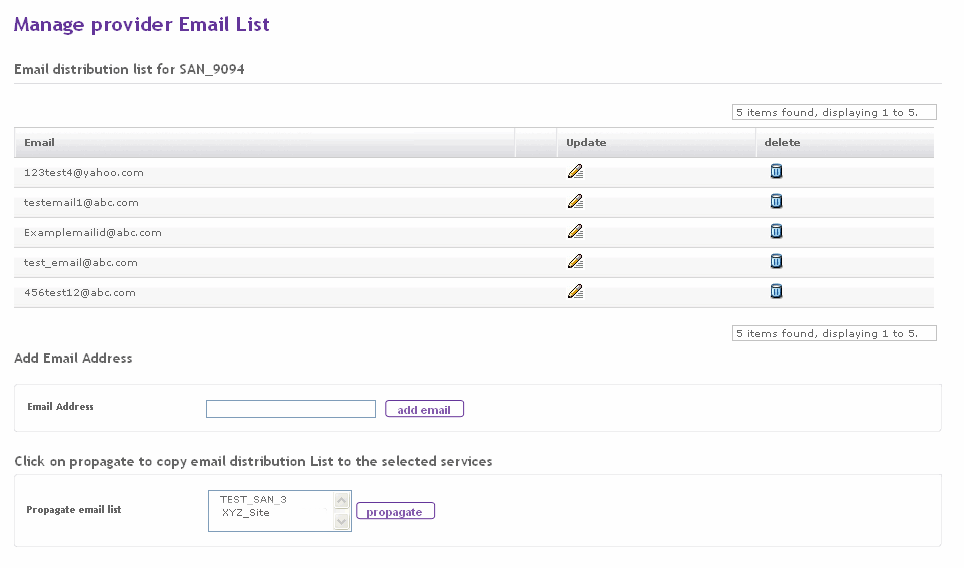
The Manage Provider Email List screen details:
| Fields | Description |
| The Email ID of a user. | |
| Email Address | Text to enter an email address. |
| Propagate email List | List of names , providing access services, to whom the email list is propagated. |
- Click ADD EMAIL to add an email address to the email list.
- Click PROPAGATE to propagate the email list to provider services selected from the Propagate email list drop-down box.
- Click
 to view the page where you can update the email address.
 - Click
 to view the warning page before performing the delete action of an email address.